Building Your Architecture Copilot
A Guide to AI Assistants for Enterprise Architects

Visionary Cloud Strategist & Tech Lead | Senior Cloud Platform Architect | Board-ready |30+ years Tech & Cloud | Ex-Military Leader | Engagement & Stakeholder Management
As an Enterprise Architect, you face daily complex challenges: designing architectures, making decisions, managing stakeholders, and staying on top of fast-evolving technology. Modern AI-powered tools can be a real game-changer in this context.
In this post, I’ll explain how you can build your own Architecture Copilot, an AI assistant that practically and efficiently supports you in your architecture tasks.
What is an Architecture Copilot?
Imagine having a personal helper available 24/7. This helper knows your architecture standards, understands business goals, and can deliver real-time suggestions, analyses, or even draft documentation. That’s exactly what an Architecture Copilot is: an AI-powered assistant that accompanies you through the daily challenges of enterprise architecture.
Why Should You Build One?
Manage Complexity: Enterprise architecture is multi-layered and often overwhelming. AI helps you maintain overview and better understand complex relationships.
Save Time: AI takes over routine tasks like documentation, research, or standard analyses, freeing you up for strategic decisions.
Improve Quality: AI can spot inconsistencies, suggest best practices, and elevate the quality of your work.
Continuous Learning: Your copilot learns from past projects and constantly improves its support.
How to Build Your Architecture Copilot
1. Understand Your Requirements
Identify tasks where AI support really pays off, for example:
Creating architecture overviews and diagrams
Analyzing system dependencies and risks
Supporting technology and tool selection
Automated creation of decision documents (e.g., architecture reviews)
2. Choose the Right AI Foundation
Combine multiple AI technologies for best results:
Large Language Models (LLMs): Like GPT-4, for natural language understanding and generation.
Knowledge Graphs: To structure and link company knowledge.
Automation Frameworks: To handle repetitive tasks and integrate with tools like Jira or Confluence.
3. Connect Your Architecture Data Sources
Your copilot needs access to:
Architecture documentation (e.g., ArchiMate, UML models)
Product backlog and requirements
IT landscape and CMDB data
Policies, standards, and guidelines
Keep your data fresh and well-structured.
4. Develop Smart Interaction Channels
Decide how you want to communicate with your copilot:
Chatbots: For natural language Q&A
Dashboards: For visual reports and analyses
Automated notifications: Via email, Slack, or Teams
5. Iterate and Learn Continuously
No AI system is perfect from day one. Collect feedback from yourself and your team, monitor where the copilot excels or struggles, and improve over time.
Tools and Technologies: The Foundation of Your Architecture Copilot
Large Language Models (LLMs) - The Core
OpenAI GPT-4 (API): Natural language processing for chatbots, document generation, complex queries.
Azure OpenAI Service: Integrate GPT models within your Azure environment.
Anthropic Claude, Google PaLM: Alternative LLMs with varying strengths.
Best Practice: Select an LLM compatible with your environment and security needs. Test it with your domain-specific terminology.
Knowledge Graphs – Your Copilot’s Memory
Neo4j, Amazon Neptune: Graph databases to model architecture artifacts, dependencies, stakeholders.
Ontologies & Metamodels: Use ArchiMate or UML standards to structure data.
Best Practice: Store architecture as a linked knowledge graph, not just documents, to enable richer AI insights.
Automation and Integration
RPA Tools (UiPath, Power Automate): Automate routine tasks and report generation.
API Integrations: Connect Jira, Confluence, ServiceNow, CI/CD pipelines for seamless workflows.
Best Practice: Integrate with tools your team already uses to reduce friction.
Preparing and Enriching Your Architecture Data
Ensure:
Up-to-date architecture models (Sparx EA, BiZZdesign, LeanIX)
Structured, indexed documentation (Confluence, SharePoint)
CMDB and infrastructure data (ServiceNow, Azure Resource Graph)
Business requirements in backlog tools (Jira, Azure DevOps)
Best Practice: Build data pipelines for regular sync and cleaning.
Interaction Methods & User Experience
Chatbots & Conversational Interfaces
Microsoft Power Virtual Agents, Bot Framework for Teams chatbots
Custom web interfaces with React or Vue calling your LLM APIs
Best Practice: Keep conversation history for context-aware replies.
Visualizations & Dashboards
Power BI, Tableau, Grafana for architecture KPIs, dependencies, risk
Mermaid.js, PlantUML for auto-generated diagrams from code
Best Practice: Support “what-if” scenario analysis to help decision-making.
Example Workflows
Automated Architecture Reviews
Copilot scans models, identifies deviations and risks, suggests patterns, and generates reports shared automatically.
Decision Support
Ask the copilot for technology recommendations with pros and cons, referencing internal projects and trends, including links to standards and lessons learned.
Governance & Security
Access control for sensitive data
Audit logs for all changes and queries
Data quality monitoring
Best Practice: Embed governance and security from the start to build trust.
Iterative Development
Start small with an MVP chatbot, gather feedback, expand features, and track usage and impact metrics.
Architecture Blueprint: Core Structure of Your AI Architecture Copilot
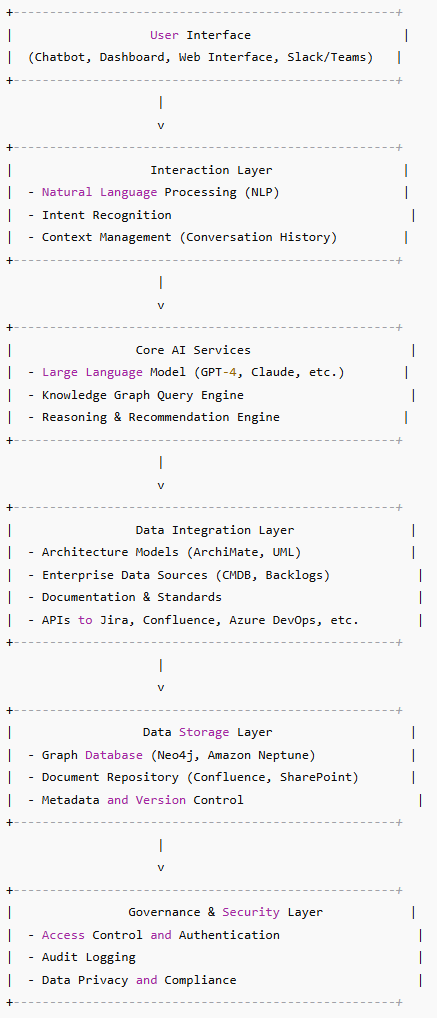
Optional Automation & Workflow Layer:
Automate reviews, notifications, Jira ticket creation, and CI/CD enforcement.
Conclusion: Your Architecture Copilot is Your New “ArchBuddy”
With the right approach, tools, and continuous feedback, an AI-powered Architecture Copilot can relieve your workload, enhance quality, and help your team deliver better architecture faster.
It’s not about replacing you, it’s about empowering you to lead strategically, data-driven, and focused on what really matters.
If you’re ready to elevate your enterprise architecture practice with AI, start exploring how to build your own Architecture Copilot today — and feel free to reach out if you want to discuss ideas, tools, or get hands-on support. Let’s shape the future of architecture together! 🚀✨
ChatGPT was consulted to help expand and detail the information presented in this guide.


